Hotspot Image
Interactive scene images with percentage-based hotspot pins that open tooltips, links, or embedded product cards.
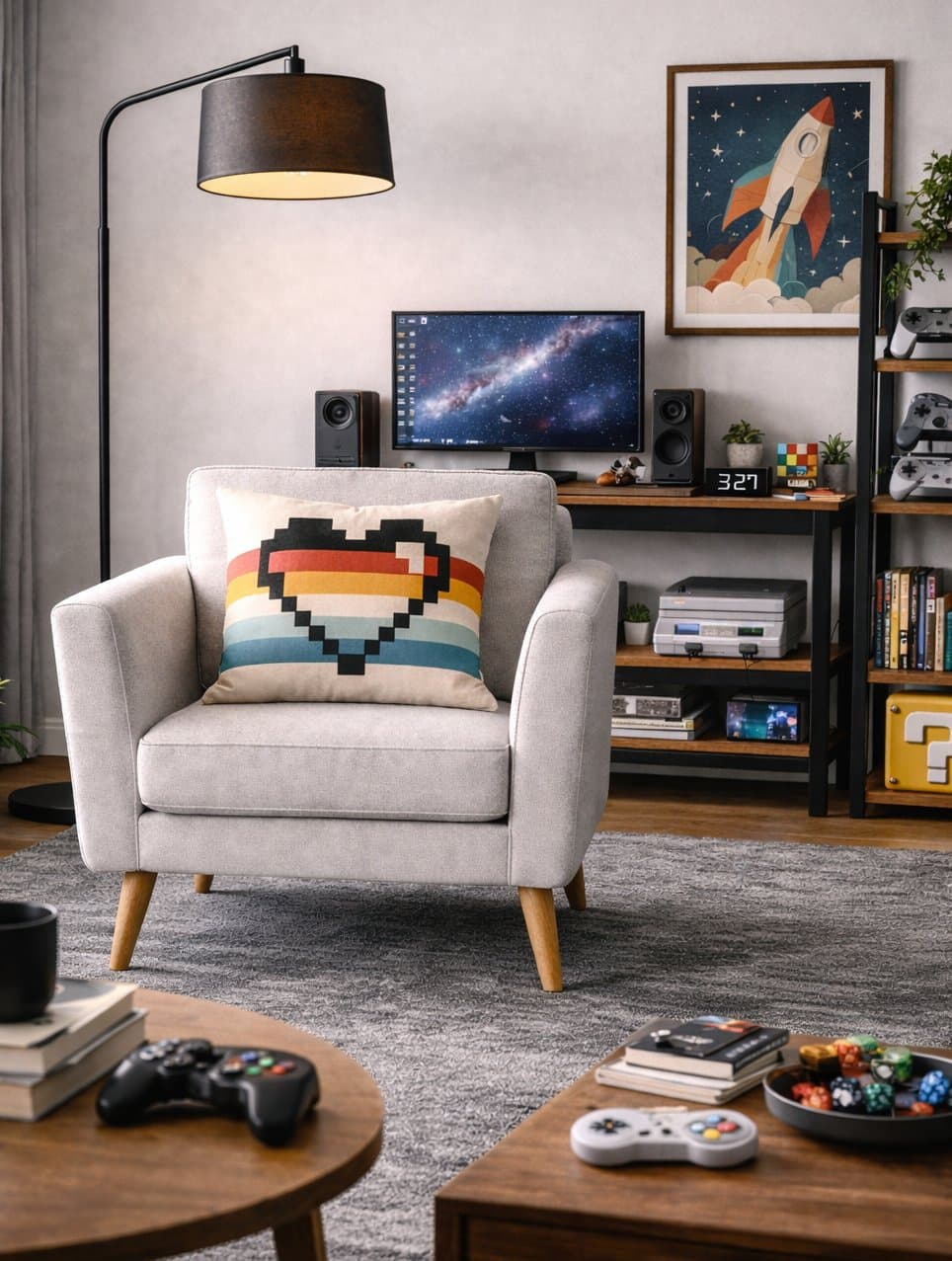
HotspotImage turns editorial scenes and product photography into interactive entry points. It keeps the source image at its natural dimensions, places pins using percentage coordinates, and lets each pin open any content you need.
Installation
npx shadcn@latest add @shoppablecn/hotspot-imageExamples
Basic scene
import { HotspotImage } from "@/components/ui/hotspot-image"
import { HotspotPin } from "@/components/ui/hotspot-pin"
import { HotspotTooltip } from "@/components/ui/hotspot-tooltip"

export function Example() {
  const scene = {
    src: "/scenes/living-room.jpg",
    alt: "Gaming lounge scene with an ivory chair, pixel heart pillow, floor lamp, retro controllers, and rocket wall art",
    width: 964,
    height: 1277,
  }

  return (
    <HotspotImage
      alt={scene.alt}
      height={scene.height}
      src={scene.src}
      width={scene.width}
    >
      <HotspotPin x={16} y={11}>
        <HotspotTooltip
          description="A matte black floor lamp that pools warm ambient light over the chair and desk side of the room."
          title="Arc floor lamp"
        />
      </HotspotPin>
    </HotspotImage>
  )
}
Pin variants
import { HotspotImage } from "@/components/ui/hotspot-image"
import { HotspotPin } from "@/components/ui/hotspot-pin"
import { HotspotTooltip } from "@/components/ui/hotspot-tooltip"

export function Example() {
  const scene = {
    src: "/scenes/living-room.jpg",
    alt: "Gaming lounge scene with an ivory chair, pixel heart pillow, floor lamp, retro controllers, and rocket wall art",
    width: 964,
    height: 1277,
  }

  return (
    <HotspotImage
      alt={scene.alt}
      height={scene.height}
      src={scene.src}
      width={scene.width}
    >
      <HotspotPin variant="plus" x={40} y={58}>
        <HotspotTooltip description="Primary product pin on the lounge chair." title="Harbor lounge chair" />
      </HotspotPin>
      <HotspotPin variant="dot" x={33} y={88}>
        <HotspotTooltip description="Secondary detail pin on the retro controller." title="Retro Wireless Controller" />
      </HotspotPin>
    </HotspotImage>
  )
}
Content types in pins
import { HotspotImage } from "@/components/ui/hotspot-image"
import { HotspotLink } from "@/components/ui/hotspot-link"
import { HotspotPin } from "@/components/ui/hotspot-pin"
import { HotspotTooltip } from "@/components/ui/hotspot-tooltip"
import { ProductCard } from "@/components/ui/product-card"
import type { Product } from "@/components/ui/types"

export function Example() {
  const scene = {
    src: "/scenes/living-room.jpg",
    alt: "Gaming lounge scene with an ivory chair, pixel heart pillow, floor lamp, retro controllers, and rocket wall art",
    width: 964,
    height: 1277,
  }

  const product = {
    id: "controller-001",
    title: "Retro Wireless Controller",
    images: [
      {
        src: "/products/retro-wireless-controller.jpg",
        alt: "Retro Wireless Controller with colorful face buttons",
      },
    ],
    price: { amount: 5900, currency: "USD" },
  } satisfies Product

  return (
    <HotspotImage
      alt={scene.alt}
      height={scene.height}
      src={scene.src}
      width={scene.width}
    >
      <HotspotPin x={16} y={11}>
        <HotspotTooltip
          description="The oversized lamp softens the gaming setup with warm light and gives the corner a more editorial feel."
          title="Arc floor lamp"
        />
      </HotspotPin>
      <HotspotPin variant="dot" x={71} y={18}>
        <HotspotLink href="/docs/components/product-card" label="See the full room edit" />
      </HotspotPin>
      <HotspotPin x={33} y={88}>
        <div className="w-[320px]">
          <ProductCard product={product} variants="none" />
        </div>
      </HotspotPin>
    </HotspotImage>
  )
}
ProductCard overlay inside a pin
import { HotspotImage } from "@/components/ui/hotspot-image"
import { HotspotPin } from "@/components/ui/hotspot-pin"
import { ProductCard } from "@/components/ui/product-card"
import type { Product, ProductVariant } from "@/components/ui/types"

export function Example() {
  const scene = {
    src: "/scenes/living-room.jpg",
    alt: "Gaming lounge scene with an ivory chair, pixel heart pillow, floor lamp, retro controllers, and rocket wall art",
    width: 964,
    height: 1277,
  }

  const variants = [
    {
      id: "upholstery",
      name: "Upholstery",
      type: "swatch",
      required: true,
      options: [
        { label: "Oat", value: "oat", swatch: "#e6ddd1" },
        { label: "Pebble", value: "pebble", swatch: "#b8b0a4" },
      ],
    },
    {
      id: "delivery",
      name: "Delivery",
      type: "radio",
      required: true,
      options: [
        { label: "Standard", value: "standard" },
        { label: "White glove", value: "white-glove" },
      ],
    },
  ] satisfies ProductVariant[]

  const product = {
    id: "chair-001",
    title: "Harbor Lounge Chair",
    images: [
      {
        src: "/products/harbor-lounge-chair.jpg",
        alt: "Harbor Lounge Chair in oat boucle",
      },
    ],
    price: { amount: 64900, currency: "USD" },
    variants,
  } satisfies Product

  return (
    <HotspotImage
      alt={scene.alt}
      height={scene.height}
      src={scene.src}
      width={scene.width}
    >
      <HotspotPin x={40} y={58}>
        <div className="w-[320px]">
          <ProductCard
            onAddToCart={() => {}}
            product={product}
            variants="overlay"
          />
        </div>
      </HotspotPin>
    </HotspotImage>
  )
}
Props
HotspotImage
Prop
Type
HotspotPin
Prop
Type
HotspotTooltip
Prop
Type
HotspotLink
Prop
Type
Accessibility
- Pins are real interactive buttons with labels.
- Popovers close on Escape and return focus to the trigger.
- Scene regions remain horizontally scrollable instead of collapsing the image.
- Embedded ProductCard content keeps its own keyboard behavior inside the popover.
Related
- ProductCard can be rendered directly inside hotspot pins.